The successful integration of AI into software development requires more than adopting new tools—it demands a structured process, collaborative mindset, and continuous feedback loops that drive both human and AI proficiency. This guide presents a practical approach for teams working with complex legacy systems.
The Strategic Context: Why This Matters
Traditional software development approaches struggle with the complexity of modern legacy systems. These systems contain invaluable business logic accumulated over years, but their documentation is often incomplete or outdated. AI-augmented development offers a path forward, but only when implemented systematically.
Setting Realistic Expectations: Based on real-world experience with legacy projects, expect productivity gains of 0-10% on complex brownfield tasks initially. The true value emerges over time through reduced cognitive load, better knowledge capture, and augmented capability rather than simple speed increases.
The Human-AI Partnership Model
The most effective approach frames AI as a collaborative partner rather than a replacement tool. This partnership evolves across different phases of development:
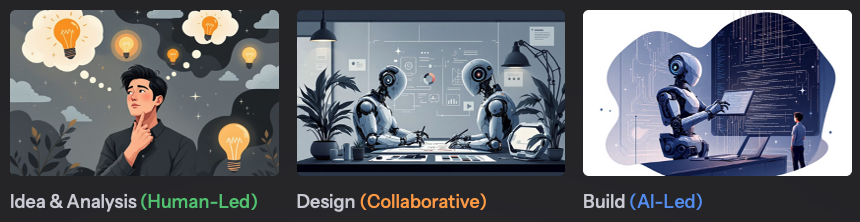
Idea & Analysis Phase (Human-Led)
Humans drive strategic planning, ideation, and high-level analysis, focusing on:
- Defining the project’s core “what” and “why”
- Strategic business objectives
- High-level architectural decisions
- Risk assessment and trade-offs
Design Phase (Collaborative)
A true partnership where:
- Humans provide crucial context and architectural direction
- AI generates and refines design options, mockups, and specifications
- Humans validate, steer, and make final decisions
- Iterative refinement based on immediate feedback
Build Phase (AI-Led)
AI handles the heavy lifting of implementation:
- Code generation based on finalized designs
- Boilerplate and repetitive code creation
- Test case generation from specifications
- Humans provide oversight, verification, and quality assurance
Building the Foundation: Prerequisites for Success
Before implementing AI-augmented workflows, establish these critical foundations:
1. Development Environment Setup
Frictionless Local Development is Non-Negotiable:
- Docker/Docker Compose for containerized services
- Local database instances for fast feedback cycles
- IDE with AI integration (e.g., Cursor with custom modes)
Why This Matters: Fast, reliable local environments dramatically shorten AI feedback cycles. Every minute saved in setup/teardown accelerates the learning loop for both humans and AI.
2. AI Tooling Configuration
Essential Integrations:
- Cursor IDE (in our case) with codebase indexing enabled (
cursor indexfor large services) - MCP (Model Context Protocol) Servers:
- Atlassian MCP for Confluence integration
- Playwright for browser automation testing
- Sequential thinking for complex problem-solving
- Custom Modes configured for Research, Plan, Action, and Review
3. Domain Knowledge Capture: The Single Source of Truth
Clear, centralized domain documentation is absolutely critical. AI cannot assist effectively without comprehensive context across three levels:
Business Level (Confluence)
- Product/feature overviews
- User flow maps and journey diagrams
- Glossary of business terms (human-reviewed)
- Use cases written in Specification by Example (SPE) format
- Links to requirements and Jira tickets
Service Level (Code)
AI-generated documentation including:
- Sequence diagrams (Mermaid or PlantUML)
- Request/response examples with edge cases
- API endpoint documentation
- Service interaction patterns
Database Level (Schema)
- Auto-generated ER diagrams from schema files
- Annotations with business meaning
- Relationship documentation
- Stored procedure documentation
For comprehensive projects, follow the Arc42 documentation standard:
- Introduction and system context
- Building block view
- Runtime view
- Glossary (human-reviewed)
- Architecture Decision Records (ADRs, human-authored)
Critical Insight: Legacy systems should be viewed as rich knowledge sources, not burdens. The business logic embedded in legacy code is invaluable for AI training and understanding.
The Core Workflow: RePAR with Custom Modes
The RePAR cycle (Research, Plan, Action, Review) is the iterative technique for mastering AI interaction. Implement it through Cursor’s custom modes for optimal results.
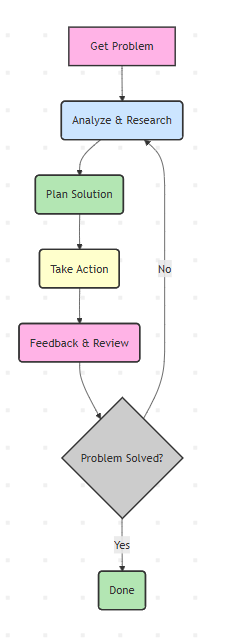
Research Mode: Understanding Before Acting
Model Recommendation: Use thinking/reasoning models (Claude Sonnet 4) for divergent analysis.
Purpose: Conduct comprehensive research before suggesting solutions.
Critical Practice: Instruct AI to ask questions when uncertain. This prevents incorrect assumptions that can derail development.
Example Prompt:
Help me research what needs to be done for the [feature name] feature.
 Context:
- @/ServiceClass.cs
- @/RelatedModels.cs
- @confluence_page_url
If you have questions or are not 100% sure about any aspect, please ask me rather than making assumptions.
Use Markdown to display code references with file paths and function names for context.
Plan Mode: Designing with Precision
Model Recommendation: Use thinking/reasoning models for creative problem-solving.
Purpose: Create exhaustive technical specifications that eliminate creative decisions during execution.
Core Principles:
1. Outside-In Development Approach
Prioritize system integration and user experience before implementation details:
Phase 1: Business Feature Specification
Phase 2: Integration-First Implementation
- Build end-to-end flow first using hardcoded data and mock responses
- Implement integration interfaces (APIs, data flow) between components
- “Fake it before you make it” – use placeholders to prove integration
Phase 3: BDD Implementation of Components
- Replace hardcoded implementations with real code using Test-Driven Development
- Follow Red-Green-Refactor cycle for each component
2. Specification by Example (SPE) with BDD
Write requirements as concrete examples in Gherkin format:
Feature: User Authentication
  As a user
  I want to log in with my credentials
  So that I can access my account
Scenario: Successful login with valid credentials
  Given I am on the login page
  And I have a registered account with email "user@example.com"
  When I enter email "user@example.com"
  And I enter password "correct_password"
  And I click the "Login" button
  Then I should see the dashboard
  And I should see a welcome message with my name
Scenario: Failed login with invalid password
  Given I am on the login page
  When I enter email "user@example.com"
  And I enter password "wrong_password"
  And I click the "Login" button
  Then I should see an error message "Invalid credentials"
  And I should remain on the login page
3. Reverse Testing Pyramid
Prioritize testing in this order:
- E2E Tests (Highest priority) – Validate complete user journeys
- Integration Tests – Verify component interactions
- Unit Tests – Test isolated logic
This inverted approach ensures the system works as a whole before perfecting individual parts.
4. Task Breakdown with Work Breakdown Structure (WBS)
Plan Storage: All plans must be stored as docs/plans/PLAN-{id}-{summary}.md with:
- Unique numeric ID
- Short summary in filename
- Markdown format with task checkboxes:
[ ]Not started[x]Completed
Example Plan Structure:
# PLAN-001-User-Authentication-Feature

## Scope
Implement secure user authentication with email/password
## Implementation Checklist
### Phase 1: Integration Shell
- [ ] Create login page UI mockup with hardcoded validation
- [ ] Implement navigation flow: login → dashboard
- [ ] Add mock authentication service returning success/failure
- [ ] Create E2E test for successful login flow
- [ ] Create E2E test for failed login flow
### Phase 2: Real Implementation (ATDD)
- [ ] Write failing unit test for password hashing
- [ ] Implement password hashing service
- [ ] Write failing integration test for user repository
- [ ] Implement user repository with database queries
- [ ] Replace mock auth service with real implementation
- [ ] Verify all E2E tests still pass
### Phase 3: Security & Polish
- [ ] Add rate limiting for login attempts
- [ ] Implement session management
- [ ] Add password strength validation
- [ ] Create audit logging for authentication events
Action Mode: Execution with Fidelity
Model Recommendation: Use non-thinking models for precise execution.
Purpose: Execute plans with 100% fidelity to specifications.
Allowed:
- Only actions explicitly detailed in approved plans
- Following ATDD methodology precisely
Review Mode: Validation and Verification
Model Recommendation: Use thinking/reasoning models for thorough analysis.
Purpose: Strictly validate plan implementation through systematic verification.
Process:
- Line-by-line comparison between plan and execution
- Verification that all tests pass, especially E2E tests
- Code quality assessment
- Documentation accuracy check
Deviation Detection: Flag any deviations explicitly:
⚠️ DEVIATION DETECTED:
Plan specified BCrypt with work factor 12,
implementation uses work factor 10
Conclusion Format:
✅ IMPLEMENTATION MATCHES PLAN EXACTLY
All E2E tests passing
All integration tests passing
Code follows specified patterns
or
❌ IMPLEMENTATION DEVIATES FROM PLAN
[List specific deviations]
Recommendation: Return to Plan Mode to address gaps
The Continuous Feedback Loop: The Binding Mechanism
The feedback loop is not just a component—it’s the central organizing principle that binds the entire workflow together and drives continuous improvement.
1. The Immediate Feedback Loop
Local E2E Testing as the Primary Feedback Signal:
The BDD/Gherkin specifications created in Plan Mode translate directly into local, executable End-to-End tests. These tests provide:
- Fastest, most objective feedback on code quality
- Immediate validation of AI-generated code
- Binary pass/fail signals that guide refinement
Prompt and Context Refinement: When local E2E tests fail:
- Analyze the specific failure mode
- Use failure details as precise feedback to refine AI prompt
- Adjust context provided to AI (add relevant code, clarify requirements)
- Iterate immediately without waiting for CI/CD pipeline
- Build prompt library of successful patterns
Why Local Testing Matters:
- Feedback cycle measured in seconds, not minutes or hours
- No dependency on shared environments or CI/CD pipelines
- Enables rapid iteration and learning
- Builds developer confidence in AI-generated code
2. The Systemic Learning Loop
Domain Knowledge Refinement: Errors identified during Review Mode must trigger documentation updates:
- Update Confluence business documentation
- Refine service-level technical docs
- Correct ER diagrams and schema annotations
- Enhance glossary with discovered terminology
- Update Arc42 documentation sections
Result: Future AI interactions start with higher-quality context, reducing error rates over time.
3. Building Trust Through Feedback
The emotional journey from frustration to confidence is mediated by feedback quality:
Initial Phase (Frustration):
- AI makes incorrect assumptions
- Code fails tests
- Developer must frequently intervene
Learning Phase (Calibration):
- Better prompts → better results
- Improved documentation → better context
- Passing tests → growing confidence
Proficiency Phase (Trust):
- AI consistently generates correct code
- Tests pass on first or second attempt
- Developer focuses on high-value review
The Human Element: Skills and Mindset
Essential Mindset Shifts
- From “How” to “What” Focus on defining desired behavior and outcomes. Let AI discover optimal implementation approaches. Your role is specification and validation, not low-level coding decisions.
- Embrace Legacy as Knowledge Legacy systems contain years of accumulated business logic and edge case handling. Frame them as rich knowledge sources for AI training, not technical debt to overcome.
- Navigate the Emotional Arc Acknowledge the journey:
- Initial enthusiasm and experimentation
- Inevitable frustrations with AI limitations
- Critical process of building trust through feedback
- Ultimate confidence in the partnership
- AI as a Junior Developer Treat AI like a capable but inexperienced team member:
- Needs clear specifications
- Requires context and guidance
- Benefits from review and mentoring
- Improves with consistent feedback
- Fast at execution but lacks domain wisdom
New Skills for AI-Augmented Development
Critical Thinking & Problem Decomposition:
- Break tasks into very small, valuable steps
- Enable rapid feedback and faster AI learning
- “Think small, win big”
Effective Prompt Engineering:
- Improve prompts iteratively based on results
- Don’t add complexity to failing prompts—refine them
- Build a library of successful prompt patterns
- Learn to provide just-enough context
AI-Assisted Understanding:
- Use AI to generate diagrams of complex systems
- Create simplified explanations of legacy code
- Accelerate onboarding to unfamiliar codebases
Quality Assurance Focus:
- Shift from writing code to reviewing code
- Strengthen test design capabilities
- Enhance specification clarity
Common Pitfalls and How to Avoid Them
Pitfall 1: Insufficient Context
Problem: AI generates incorrect code due to missing domain knowledge. Solution: Invest heavily in three-level documentation before scaling AI usage.
Pitfall 2: Skipping the Plan Mode
Problem: Jumping directly to implementation leads to rework and confusion. Solution: Make Plan Mode mandatory. The time invested pays dividends in execution quality.
Pitfall 3: Over-Relying on AI Judgment
Problem: Accepting AI suggestions without critical review. Solution: Always validate against tests and domain knowledge. AI is a tool, not an oracle.
Pitfall 4: Ignoring Feedback Signals
Problem: Continuing with failing approaches instead of iterating. Solution: Treat test failures as learning opportunities. Refine prompts and context immediately.
Pitfall 5: Unrealistic Productivity Expectations
Problem: Expecting 10x improvements immediately on legacy systems. Solution: Set realistic goals (0-10% initial gains), focus on learning and capability building.
Pitfall 6: Poor Local Development Setup
Problem: Slow feedback cycles kill momentum and learning. Solution: Prioritize fast, reliable local environments. Every second counts.
Conclusion: The Partnership Paradigm
AI-augmented software development is not about replacing developers—it’s about augmenting human capabilities through systematic partnership. Success requires:
- A Stable Process (SOP): Clear workflows, documented standards, and repeatable practices
- Collaborative Mindset: Viewing AI as a junior partner that needs guidance and learns from feedback
- Sophisticated Techniques (RePAR): Structured interaction patterns through custom modes
- Continuous Feedback Loops: Fast, local testing that drives both human and AI learning
- Realistic Expectations: Understanding that value compounds over time through capability building
The teams that thrive in this new paradigm will be those that invest in:
- Environment: Frictionless local development and comprehensive documentation
- Process: Structured workflows with clear feedback mechanisms
- People: Skills development and personalized adoption strategies
- Mindset: Embracing partnership over replacement, augmentation over automation
This is not just a new set of tools—it’s a new way of building software. The journey from process to practice requires patience, experimentation, and commitment to continuous learning. But for teams willing to make the investment, the rewards are substantial: faster delivery, better knowledge capture, reduced cognitive load, and ultimately, more satisfying and impactful work.

