How a side project from Internal Tech Days became our team’s secret weapon for AI-assisted development — and why it still matters even as context windows grow
Editor’s note: This project was built and presented at Titansoft Internal Tech Days in August 2025, when most LLM context windows topped out at 128K–200K tokens. Since then, the landscape has shifted — Claude, GPT, and Gemini have all pushed toward 1M+ token windows. The original narrative has been kept intact, with an updated section at the end covering what’s changed and why the core approach still holds up.
If you work in software and you’ve tried pair-programming with an AI assistant, you’ve probably experienced the honeymoon phase: the first few exchanges are magical, the model understands your codebase, respects your conventions, and churns out code that fits right in. Then, around turn 30, something shifts. The assistant starts contradicting itself. It forgets the architecture you explained ten minutes ago. You spend more time correcting it than it would have taken to write the code yourself.
At Titansoft, we hit this wall hard. Our teams work on complex, long-lived products with deep domain logic and interconnected services. AI coding assistants were supposed to accelerate our sprints. Instead, they were becoming the teammate who shows up to standup having forgotten everything from yesterday.
“I literally had to re-explain the same service flow for the third time in the same session. At that point I thought, maybe I should just talk to a rubber duck instead.” — An actual developer on our team, during a retro.
What’s Actually Happening Under the Hood
Large language models are stateless. That’s a fancy way of saying they have no memory. Every time you send a message, the model receives the entire conversation history as input, processes it, and responds. The only “memory” it has is the context window — a fixed-size buffer that, at the time of this project (August 2025), typically ranged from 128K to 200K tokens for most models.
That might sound like a lot, but consider what happens during a real development session. You paste in code snippets, reference documentation, discuss architecture, go back and forth on implementation details. A single feature conversation can burn through the entire window. When it fills up, the model starts dropping the oldest information — with no understanding of what was important and what wasn’t.
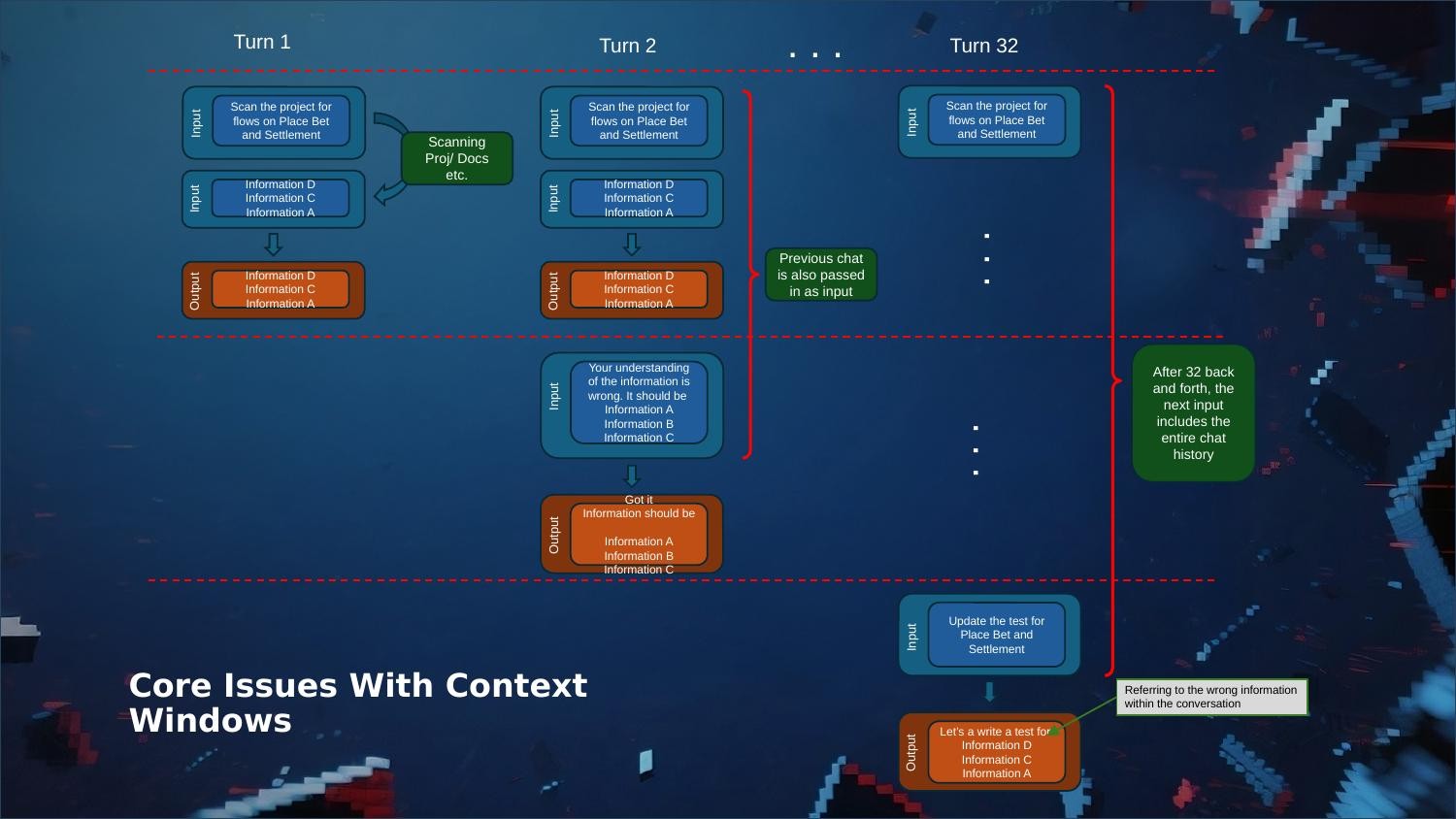
The result is an assistant that gradually loses the plot. It references the wrong information, suggests approaches you already rejected, and generates code that contradicts your project’s design decisions. Sound familiar?
Our First Fix: The Giant Markdown File
Our team’s first instinct was the same as everyone else’s in the developer community: write it all down. Tools like Cursor have cursor.rules, Claude has claude.md — persistent documents that get injected into every conversation. We created detailed project context files covering our architecture, coding conventions, domain knowledge, and key decisions.
For smaller projects, this worked well enough. But our products aren’t small. As the markdown files grew into thousands of lines, we ran straight back into the same context limit problem. The file itself was eating up a huge chunk of the token window before we even asked a question.
During one sprint, a developer noticed the AI had silently rewritten a section of our markdown knowledge base that was perfectly correct. Because the file wasn’t version-controlled at that point, the “correction” went undetected for two days. That was the moment we knew we needed a different approach.
We also tried splitting into multiple markdown files — one per domain area. But that introduced its own headaches: where do you store information that spans multiple domains? How do you keep duplicated context in sync? It felt like we were managing a tiny, fragile wiki instead of shipping features.
Enter RAG: The Pattern Behind Every Smart AI Product
Here’s a question we started asking ourselves: how do AI companies like Anthropic and OpenAI build products that deliver context-aware responses at scale, when they’re running the same stateless LLMs we are? The answer is Retrieval-Augmented Generation — RAG.
The idea is elegant: instead of cramming everything into the prompt, you store your knowledge in a vector database. When a question comes in, the system converts it into an embedding, searches for the most relevant chunks, and injects only those into the prompt. The model gets precisely the context it needs, and the context window stays free for actual conversation.
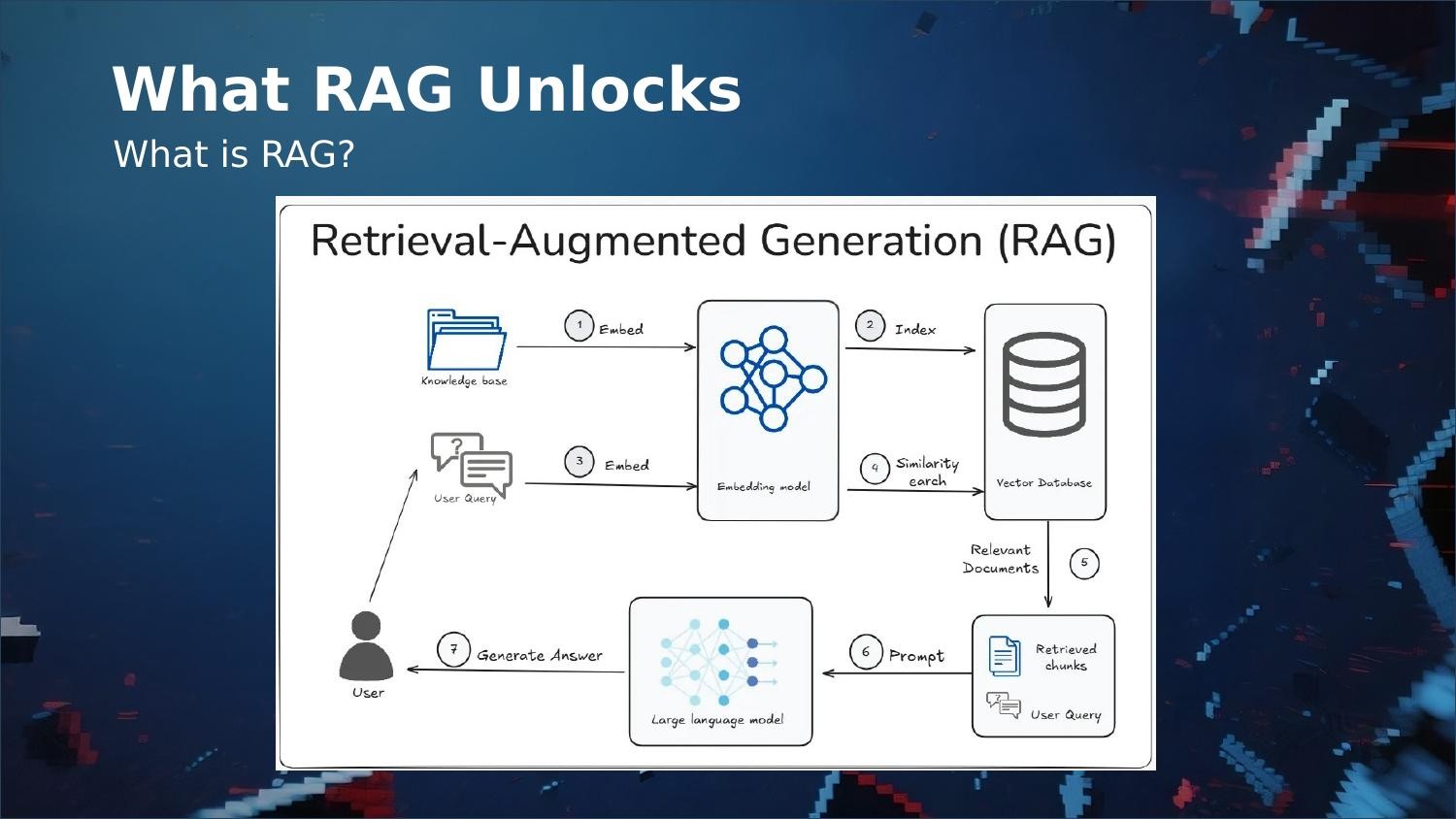
This solves every problem we had with markdown files. The knowledge base can grow indefinitely without impacting the context window. Retrieval is targeted. Updates are granular — you modify individual chunks, not a monolithic document. And because the vector database lives outside the LLM, your knowledge persists across conversations, sessions, and even different AI tools.
Why Not Just Buy One?
Managed RAG services exist from AWS, Azure, and Google — but they’re designed for enterprise-scale applications, not a development team trying to give their coding assistant better memory. The cost and configuration overhead are massive overkill for our use case.
Open-source RAG solutions are out there too, but most require running a local LLM, setting up infrastructure, and stitching together multiple components. None of them integrated cleanly with the tools we actually use day-to-day: Cursor, Claude Code, and RovoDev CLI.
I evaluated several open-source options during a spike. The common thread was that they were built as standalone chatbot systems, not as context providers for existing AI tools. I needed a plug-in, not a platform.
So We Built Our Own — As a Tech Days Project
At Titansoft, Internal Tech Days give engineers dedicated time to explore ideas that might benefit the team. It’s part of how we practice continuous improvement — not just in our processes, but in our tooling. This project started as my Tech Days pitch: what if I built a lightweight RAG system that plugs directly into our existing AI workflows via MCP?
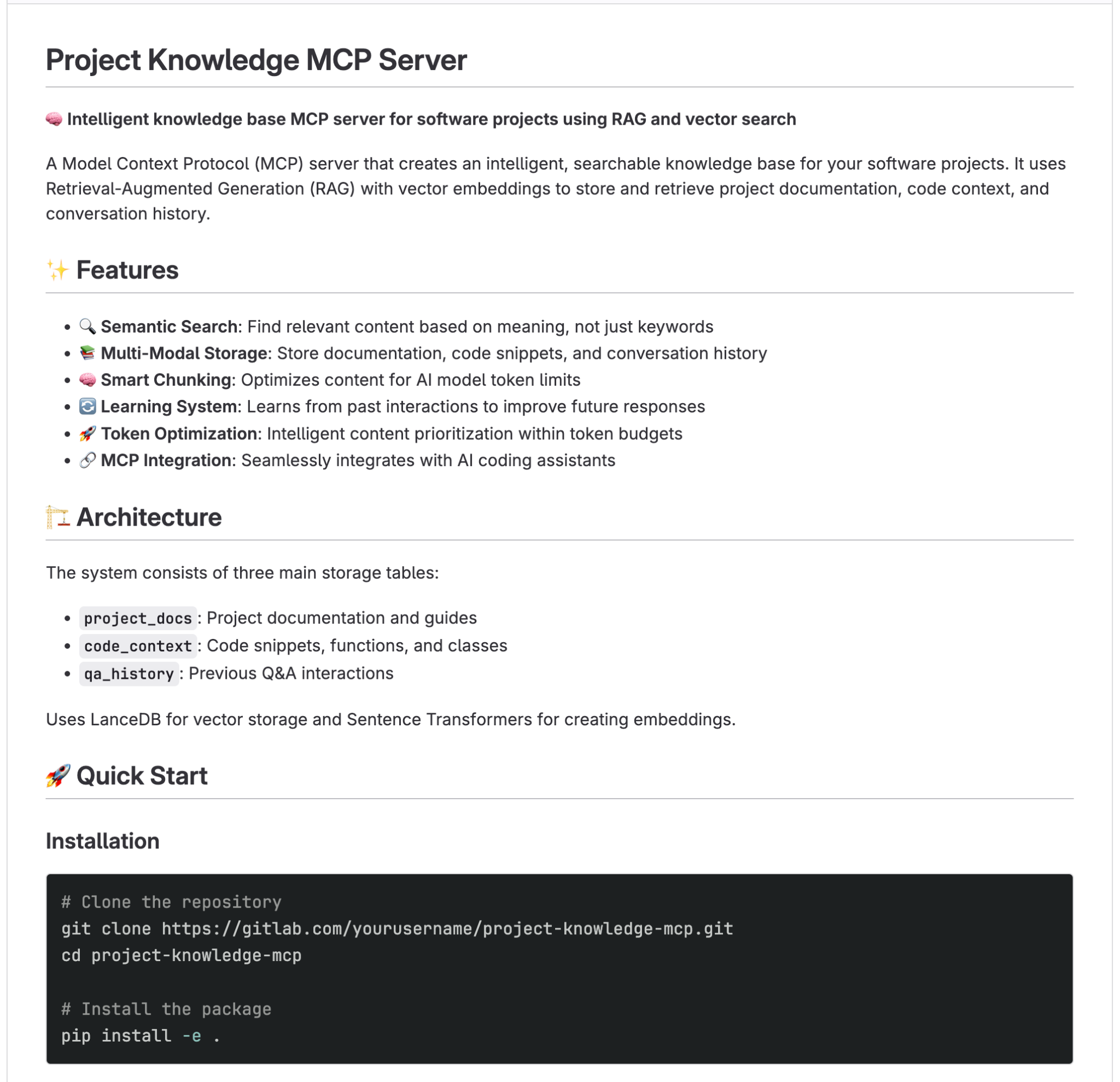
MCP — Model Context Protocol — is an open standard that lets AI tools connect to external services through a standardized interface. Any tool that supports MCP (Cursor, Claude Desktop, Claude Code, RovoDev CLI) can connect with a one-time configuration. No cloud bills. No local LLM overhead. Just a persistent, searchable knowledge base.
How It Works in Practice
The workflow fits naturally into how our teams already operate. During sprint work, a developer uses Cursor or Claude Code with the Atlassian MCP to pull in Jira stories and Confluence documentation. They review the project codebase, summarize the important context, and use the Local RAG MCP to embed and store it as vectors. The next time a similar question comes up — in the same session or weeks later, in a completely different tool — the RAG MCP retrieves the nearest vectors and feeds them as context.
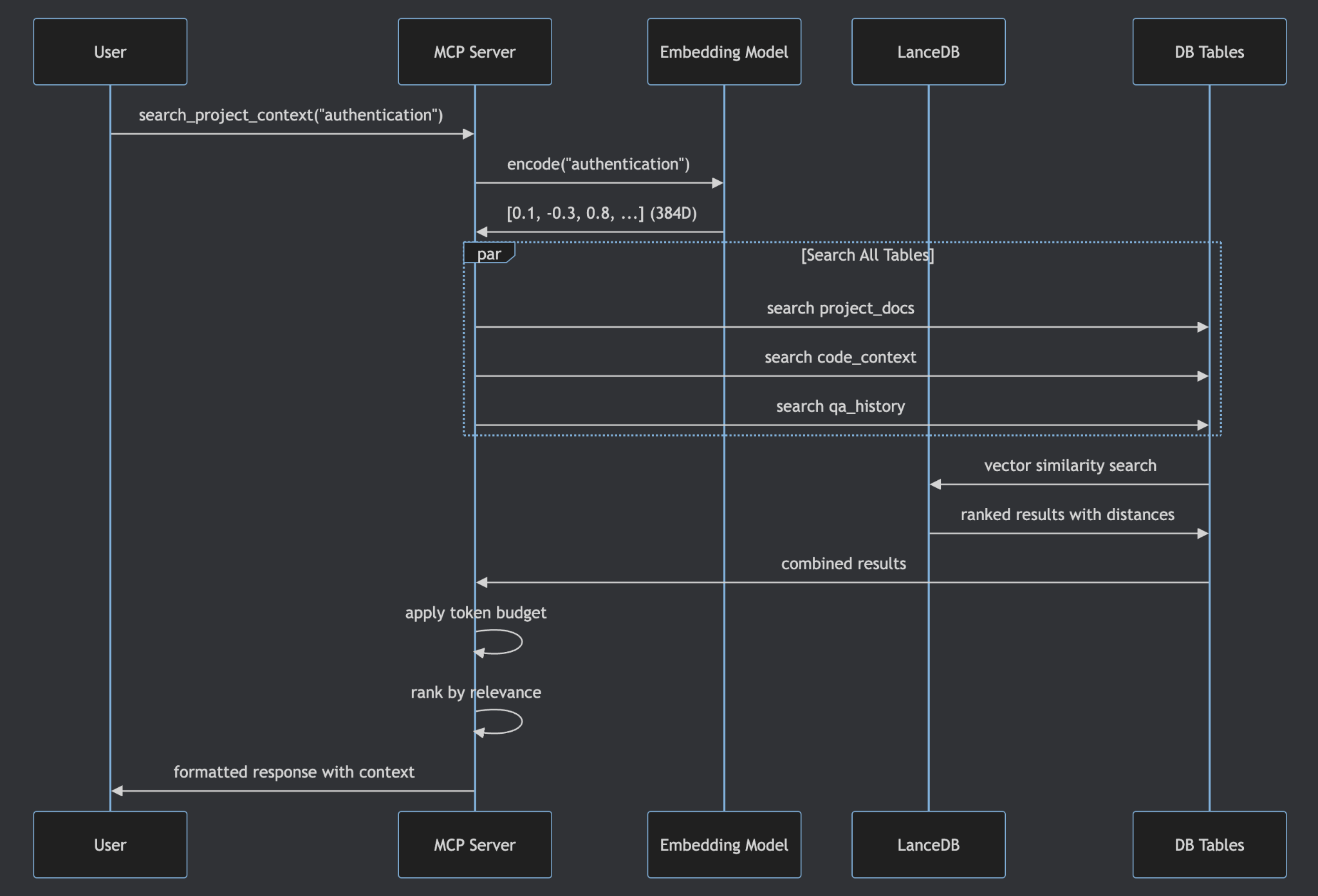
The server supports partial updates, so you can insert, modify, or delete individual knowledge entries without re-ingesting everything. You can also list all data in the vector database directly from the MCP interface — full transparency into what your AI assistant actually knows.
From Side Project to Sprint Tool
What started as a Tech Days experiment has become a genuine part of our workflow. One of the most exciting applications is AI-generated Product Backlog Refinement. With a matured RAG knowledge base in place, the assistant reads a Jira story, retrieves relevant project context from the knowledge base, generates a comprehensive PBR document, and updates the Jira ticket — all through a single conversational workflow.
Our Product Owners were skeptical at first. Then one of them saw a PBR document generated in 30 seconds that would have taken 45 minutes to write manually. The skepticism didn’t last long.
This is the kind of thing that happens when you give engineers space to experiment. The project wasn’t on any roadmap. It came from a real pain point, was prototyped during dedicated innovation time, and proved its value quickly enough that the team adopted it organically. That’s agile in practice — not the ceremonies, but the culture of continuous improvement and psychological safety to try new things.
March 2026 Update: What’s Changed Since We Built This
A lot has happened in the six months since this project was presented at Tech Days. Context windows have grown dramatically. Claude Opus 4.6 and Sonnet 4.6 now support 1 million tokens. OpenAI’s GPT-5.4 offers 1 million tokens via API. Google’s Gemini models range from 1M to 2M tokens. The 128K–200K limits that motivated this project have, for some models and tiers, expanded fivefold or more.
So does that mean the context crisis is solved? Not quite. Larger windows help, but they don’t eliminate the core issues. Context degradation still occurs — models struggle with accuracy when the relevant information is buried deep in a massive prompt. Token costs scale with window size, so stuffing a million tokens into every request is expensive. And the fundamental problem of persistence across sessions remains: a bigger window doesn’t give the model memory between conversations.
RAG remains the structural answer to these challenges. It keeps prompts lean by retrieving only what’s relevant, it persists knowledge across sessions and tools, and it scales independently of whatever context window the latest model happens to offer. The window size race is good news for developers, but it’s a complement to RAG, not a replacement for it.
Context Crisis, Meet Context Clarity
The developer context crisis isn’t a flaw in AI — it’s an inherent consequence of stateless architectures operating within fixed token budgets. The markdown file was our first answer, but it simply moved the problem. RAG provides the structural solution: decouple the knowledge store from the conversation, retrieve only what’s relevant, and keep the context window free for what actually matters — the development dialogue.
By packaging this as a lightweight, in-house MCP server, we removed the friction that kept RAG out of everyday developer workflows. No cloud subscriptions, no local model overhead, no complex pipelines — just a persistent, searchable knowledge base that plugs directly into the AI tools we already use.
The approach itself is straightforward enough to replicate: a vector database, an embedding model, and an MCP interface are all you need to get started. If this is the kind of problem-solving culture that excites you, we’re always looking for engineers who’d rather build the solution than complain about the limitation.
Zhengguang Han is a software engineer at Titansoft, where he works on AI-assisted development tooling and backend systems. This article is based on his presentation at Titansoft Internal Tech Days 2025.
 T.8ytes by Titansoft