If you use a microservice architecture in your project, you may encounter challenges when running automated integration tests. Services often depend on other internal or third-party services, making it difficult to maintain practical and comprehensive test coverage. Fortunately, several solutions exist to address this challenge. One such solution is WireMock .NET, which we will explore in this article.
The Challenges of Integration Testing in Microservices
Microservices architecture inherently involves dependencies on external services, either managed by other teams or provided by third-party vendors. These dependencies introduce complexities when running integration tests. Traditional integration testing methods have trade-offs that affect reliability, cost, and ease of use.
Traditional Integration Testing
One approach is to test against the actual external services, mimicking production behaviour. This method offers the highest realism and test coverage, as it ensures that every line of code is executed as it would be in production. However, this approach has drawbacks:
- External services may be unavailable if still under development, blocking testing efforts.
- Third-party APIs can introduce extra costs, making frequent test runs expensive.
- Setting up test data and controlling external service behaviour can be difficult.
- A single service outage can cause test failures, reducing test reliability, or potentially blocking the CI/CD pipeline for urgent releases.
- Unstable network conditions or API changes can lead to inconsistent test results.
This approach, while useful in some cases, is rarely practical in a fast-paced development environment where stability, repeatability, and efficiency are crucial.

Mocking API Clients
An alternative is to mock the API client within your service using libraries such as NSubstitute or Moq. This isolates your code from external dependencies and allows you to control external behaviour to fit specific test scenarios, making tests more predictable and reliable. However, this approach also has limitations:
- It requires structuring the code to separate the API client into its own module. Usually, this won’t be a problem if you follow clean code principles such as SOLID.
- Tests rely on assumptions about external behaviour, which can become outdated. The mocked responses may not accurately represent real-world conditions, leading to undetected issues.
- Test coverage is reduced since the actual API client logic (retry mechanism, error handling, and serialisation/ deserialisation) is not tested.
Despite these drawbacks, mocking API clients remains useful for unit tests or stable external services that rarely change.

Mocking API Services
A more balanced solution is using an over-the-wire test double, such as WireMock and WireMock .NET. This method provides high test coverage while allowing control over external service behaviour. It allows the test suite to communicate with a simulated API over HTTP, closely resembling real interactions.
Although learning a new tool and maintaining mock configurations can be challenging, the benefits often outweigh these drawbacks. This approach retains the realism of integration testing while improving test reliability and predictability. It also minimises maintenance overhead compared to traditional integration testing.

Why Choose WireMock?
There are many over-the-wire test double tools, both free and paid, open source and proprietary. As a fun fact, the tech community has actually compiled a list of such tools in this Wikipedia page. Choosing the right one is crucial, as switching tools later can be costly. WireMock was selected for several reasons:
- It is free and open-source, reducing long-term costs.
- It supports .NET and the communication protocols used in our company, including HTTP and gRPC.
- It has strong community adoption and ongoing development, ensuring long-term support and improvements. In fact, it has one of the most Github stars compared to other open source alternatives.
- It offers detailed request matching, response templating features, and many more advanced features.
- It integrates seamlessly into both local development and CI/CD pipelines.
WireMock 101
WireMock simulates HTTP-based APIs by creating a configurable fake server. It allows developers to define request-response mappings, enabling realistic API interactions without requiring access to the actual external services. Key features include:
- Over-the-Wire Test Doubles: Simulates real network interactions instead of simple method stubbing.
- Flexible Configuration: Supports fluent API and static JSON mappings.
- Advanced Request Matching: Matches requests based on headers, query parameters, request bodies, and more.
- Response Templating: Uses Scriban to generate dynamic responses based on incoming requests.
- Fault Simulation: Mocks response delays, timeouts, and errors to test system resilience.
- Proxying & Recording: Captures real API responses for playback in tests, helping to ensure the accuracy of mocks.
- gRPC Support: Although limited in WireMock .NET, some support is available for gRPC-based services.
Using WireMock
There are two ways to use WireMock:
- Standalone Server Mode: Runs as a separate process, allowing multiple applications to connect to the same mock server.
- In-Code Package: Integrated directly into test code, enabling tests to define API behaviour dynamically.
It is important to note that WireMock and WireMock .NET are two separate projects, maintained by different authors. WireMock is originally written in Java, but WireMock .NET provides a C# implementation. Still, WireMock .NET tries to mimic the functionality of the original project as much as possible. The table below compares both versions:
| WireMock | WireMock .NET | |
| Written in | Java | C# |
| HTTP/HTTPS support | Yes | Yes |
| gRPC support | Yes | Limited |
| GraphQL support | Yes | Limited |
Standalone Server Mode
WireMock can run as a standalone process, as long as you have the JAR file:

For WireMock .NET, you can install it as a dotnet tool:

There’s also an official docker image that you can run here if that’s what you want.
Once the server is running, you can configure it using JSON mappings or via its Admin API. For the Admin API, you need to configure it with REST API calls, which can be done for HTTP clients such as Postman, or cURL (if you feel fancy).
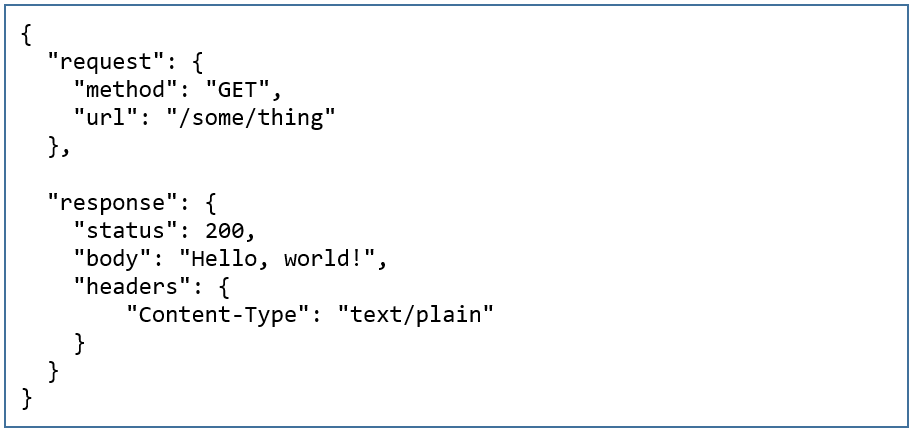
You can refer to these official documentations for more information:
- https://wiremock.org/docs/standalone/java-jar/
- https://wiremock.org/docs/standalone/docker/
- https://wiremock.org/docs/stubbing/
- https://wiremock.org/docs/standalone/admin-api-reference
- https://github.com/WireMock-Net/WireMock.Net/wiki/WireMock-as-dotnet-tool
- https://github.com/WireMock-Net/WireMock.Net/wiki/Stubbing
- https://github.com/WireMock-Net/WireMock.Net/wiki/Admin-API-Reference
In-Code Package
Installing WireMock as a package in your test project allows direct configuration within test code using a fluent API, making it straightforward to use. This approach is useful when tests require dynamic configurations based on different scenarios. For WireMock .NET, the picture below shows how to configure the mock server’s behaviour in the testing code.

Integration in our Workflow
WireMock is particularly useful for mocking third-party services that are paid or inaccessible from local or staging environments. It integrates seamlessly with CI/CD pipelines since mock servers are easy to configure and inexpensive to run. Our team has benefited from WireMock in the following ways:
- Reducing reliance on external services: Some third-party APIs have rate limits, cost implications, or access restrictions, making WireMock an ideal alternative for testing.
- Improving test reliability: Mocked responses eliminate variability due to network issues or service outages.
- Facilitating local development: Developers can work on features without requiring access to actual services.
- Faster feedback loop: Running tests with WireMock is significantly faster than relying on external APIs.
Although WireMock could also help our company run local instances of microservices by providing consistent mocks, we opted for a different solution outside the scope of this article.
Overcoming Challenges
Despite its advantages, WireMock .NET has some challenges:
- Incomplete Feature Set: It lacks full parity with the original WireMock, particularly in advanced protocols like GraphQL and gRPC.
- Learning a New Tool: Developers must familiarize themselves with WireMock in addition to the other tools they already use, which can require time and effort, especially when adopting advanced features like request matching and response templating.
- Limited Documentation: As a community-driven project, finding documentation and examples can sometimes be difficult. However, engagement with community forums and GitHub discussions often helps resolve issues.
- Mock Maintenance: Keeping mock configurations updated requires periodic review to prevent outdated responses.
Conclusion
WireMock .NET provides a powerful and flexible approach to integration testing in microservices, balancing realism with test reliability. While traditional integration testing and API client mocking each have trade-offs, WireMock enables a more practical and scalable solution.
WireMock .NET presents a compelling approach to improving test coverage, reducing reliance on external services, and streamlining CI/CD processes. While adoption comes with challenges, its potential benefits make it a valuable tool for modern API testing. As technology evolves, exploring robust testing tools like WireMock can help ensure that microservices architectures remain efficient, scalable, and resilient.
 T.8ytes by Titansoft